
Your iPoker tables in place. Your lobbies left alone.
Poker Tiling Manager now recognises the shared iPoker Windows desktop table format, including Grosvenor Poker. Place recognised tables into your saved sections across one or several monitors alongside your other supported poker clients.
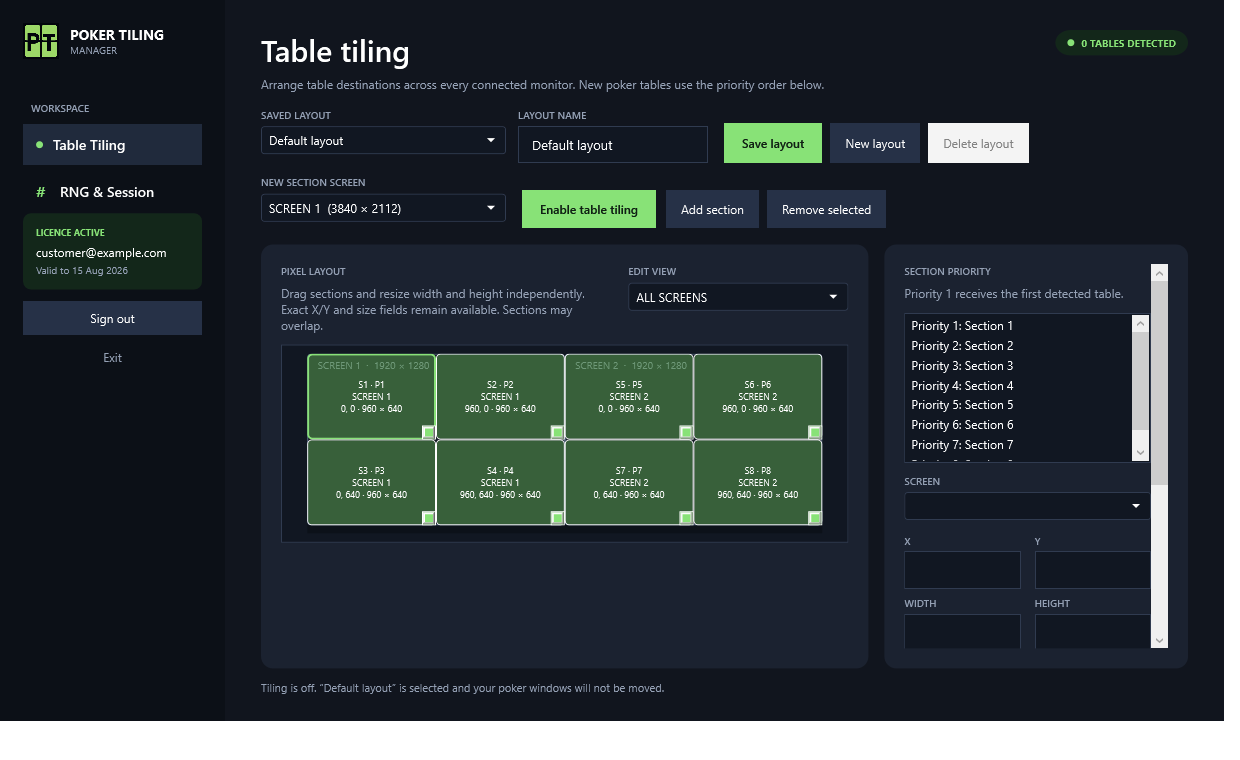
Exactly what the software does
Version 0.9.10 adds network-level table detection, tested against two live Grosvenor tournament tables, two tournament lobbies and the main lobby. Other iPoker skins using the same desktop process and table format use this integration; individual skins, languages and client versions have not all been live-tested.
Table and lobby separation
Grosvenor tables do not need the word Table in their title. The detector checks the shared PokerClient process, native Qt window class, game type, stakes and version format. Tournament names alone do not qualify, so the main and tournament lobbies stay outside your layout.
Shared iPoker recognition
Detection is based on the common client format rather than the word Grosvenor. A compatible iPoker skin can use the same saved layouts without a separate brand-specific rule. A skin with a different process or title format needs a compatibility check.
Named multi-monitor layouts
Save and name layouts, choose all screens or a single monitor in the editor, and arrange sections using mouse drag-and-resize or independent pixel width and height values.
Priority, overlaps and mixed clients
Recognised iPoker tables enter the next available section in your priority order. Sections may overlap, and the same layout can contain tables from other supported clients.
RNG and session tools
Use the manual 1–100 Roll button or automatic refresh every 1, 2 or 5 seconds. The session timer begins with the first supported table detected after launch, including iPoker, and resets when Poker Tiling Manager closes.
Copy or search a verified iPoker name
From version 0.9.11, Ctrl+click a visible name to copy it or open its iPoker player page on SharkScope. Repeated local image reads are checked against exact names in recent local tournament history for the clicked table. This corrects ambiguous letters and numbers without uploading your histories. Unclear names and countdowns do not trigger a search.
From installation to a working layout
- 01
Update Poker Tiling Manager
Close older copies and download version 0.9.11 or newer. Extract the complete ZIP to a permanent folder and sign in with your existing account.
- 02
Open a real iPoker table
Launch Grosvenor Poker or a compatible current iPoker Windows desktop client. Open an actual playing table; opening its tournament lobby alone should not increase the detected-table count.
- 03
Choose your named layout
Select or create a saved layout, choose the screen to edit, and position and size your sections. Keep destinations within your monitor working areas.
- 04
Enable tiling and check the result
Enable table tiling, then check that the playing tables occupy your sections and the lobbies remain where you left them. Test your client and table sizes before starting a multi-table session.
- 05
Choose your player lookup
On RNG & Session, choose Sharkscope search or Copy names. Wait until the client has recorded a hand locally, then hold Ctrl and click directly on an unobscured player name. Search mode also copies the name and opens https://www.sharkscope.com/poker-statistics/networks/iPoker/players/ followed by the safely encoded player name. Choose Disabled to turn both actions off.
Windows and monitor requirements
- 64-bit Windows 10 or Windows 11 and the Microsoft .NET 8 Desktop Runtime.
- A current iPoker Windows desktop client using the supported PokerClient/Qt table signature; Grosvenor version 26.7.1.12 was used for live validation.
- Player lookup additionally requires compatible local tournament history from the current client. Validated on Grosvenor tournament tables; cash-table history and every other skin or language are not yet validated. No local record means no lookup, rather than a guessed spelling.
- One or more connected monitors. A 1920×1080 or larger main display is recommended; very small slots may be limited by the poker client's minimum table size.
- An active Poker Tiling Manager subscription and an internet connection for licence checks. Browser and mobile poker versions are not supported.
Common problems
Only the tournament lobby is open
A lobby is deliberately not a table. Open the actual playing window and check the detected-table count again.
A different iPoker skin is not detected
The shared integration supports the tested Windows signature, not every historical or localised client format. Send support your poker room, client version, exact table title and a screenshot using the iPoker / Grosvenor compatibility-report option.
A table does not fit my chosen size
First check that the section is within the correct screen. A client can impose minimum dimensions or other sizing restrictions. Try a larger section and report the table size and Windows display scaling if the edges still differ.
Ctrl+click does not copy an iPoker name
Check that you have version 0.9.11 or newer and have enabled Copy names or Sharkscope search on RNG & Session. Wait for a hand to be recorded locally and try when the name is visible rather than covered by a countdown. Missing or incompatible tournament history, unclear text or conflicting matches deliberately produce no lookup. SharkScope coverage and access are separate from this shortcut.
First 3 days free. One Windows device.
Use every supported client and every layout feature. Payment details required. After 3 free days, billing starts automatically at £3.99 GBP/month in the UK or $4.99 USD/month elsewhere. Cancel through the customer portal before your trial ends to avoid the first charge.